Smart Projector Wholesale Guide: Native 1080P vs "4K Support", Brightness Claims and Auto-Keystone Explained
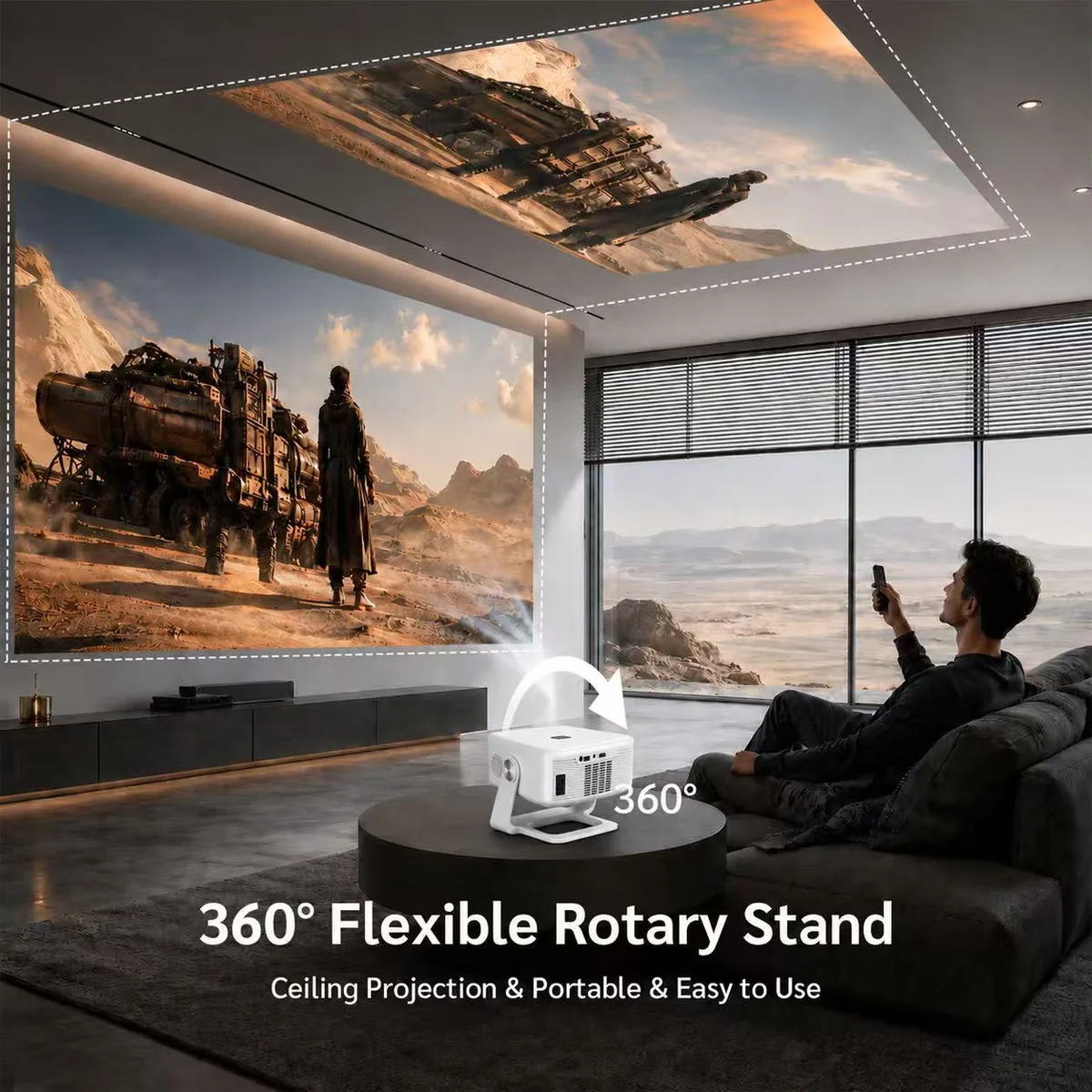
Few consumer-electronics categories have as many inflated claims as home projectors. Resolution, brightness and “smart” features are described in ways that sound similar but mean very different things, and the buyer who does not read them carefully ends up with returns. This guide explains how to read the specification of a modern smart projector, using the Sournex Android 14 Smart Projector with 360° Rotating Stand as the example.
Native resolution vs “4K support”
This is the most misunderstood line on any projector listing. Native resolution is the number of pixels the optical engine can actually display. “4K support” usually means the projector can accept a 4K video signal and then scale it down to its own panel. It is a compatibility feature, not a sharper picture.
The Sournex smart projector is built around native 1080P (Full HD) and accepts 4K input. That is a perfectly good position for living-room and bedroom use — just describe it accurately in your own listings. A reseller who writes “4K projector” on a native 1080P device invites negative reviews and marketplace takedowns; “Native 1080P, 4K supported” is both honest and still a selling point.
Brightness: ANSI lumens vs everything else
Brightness is where listings stray furthest from reality. A few rules of thumb:
- ANSI lumens is a standardized measurement. When a supplier gives you an ANSI figure, ask whether it was measured on the finished product.
- “Lumens” without “ANSI” or “LED lumens” can be several times higher than the ANSI value for the same device. Never compare these numbers directly.
- Brightness only matters relative to room light and image size. A modest-brightness projector is excellent in a dark bedroom at 80 inches and disappointing in a bright room at 120 inches.
Brightness, lamp / light-source life, power consumption and dimensions depend on configuration, so ask for the datasheet that matches your order and measure a sample in your own conditions before you commit to volume.
What “smart” calibration features really do
| Feature | What it does | Why it matters for returns |
|---|---|---|
| Auto focus | Sharpens the image automatically when the projector is moved or the throw distance changes | Out-of-focus images are the top reason first-time users think a projector is “broken” |
| Auto keystone correction | Squares up a trapezoid-shaped picture caused by projecting at an angle | Saves users from fiddling with menus; makes ceiling and tilted setups workable |
| Obstacle avoidance | Detects objects in front of the lens and resizes the picture to avoid them | Handy for shelves and furniture in real homes |
| Auto screen fit | Fits the picture to the wall or screen area | Reduces setup time; good for gifting |
These automatic features are what make a projector feel like a consumer product rather than a hobbyist one. Ask for a short video from the factory showing them working on your sample, and test them at different distances and angles, not only the demo position.
The 360° rotating stand
The Sournex model uses an integrated rotary stand that lets the body tilt through a wide range. Practical benefits: ceiling projection while lying in bed, easy aiming without books under the projector, and carrying it between rooms. Check that the stand holds its angle firmly (no sagging over time) and that the cables and vents are not blocked at extreme angles.
Android 14, apps and streaming services
The projector runs Android 14 and includes an app store, so customers can install streaming and entertainment apps directly. That removes the need for an external TV stick and is a real convenience.
A word of caution for resellers: availability and official support of specific streaming apps vary by device, region and licensing. Some major streaming services require device-level certification, and an app that can be sideloaded is not the same as an app that is officially supported and certified on that hardware. Avoid writing “Netflix built in” or similar in your listings unless you have confirmed the licensing status for the exact model and market. A safer and accurate line is “Android 14 with app store access.” Test the apps your target customers use most on a real sample before advertising them.
Connectivity and inputs
- Dual-band WiFi (2.4G + 5G) for stable streaming and wireless screen mirroring from phones.
- Bluetooth for sending audio to speakers or headphones, or for using the projector as a speaker.
- HDMI, USB, AV and audio out for game consoles, TV sticks, laptops and external speakers.
Sample-testing checklist before you order volume
- Measure image size vs. throw distance and judge brightness at your typical room lighting.
- Run auto focus and auto keystone from several positions.
- Play a 1080P and a 4K file from USB and from an app; check scaling and audio sync.
- Test WiFi stability and phone screen mirroring on both iPhone and Android.
- Run it for several hours and listen for fan noise; touch-check the housing temperature.
- Confirm the remote, power adapter and plug type for your market, and request the relevant certification documents.
For documentation and factory background, see how Sournex verifies every supplier; for customization such as your own logo, packaging or launcher, see OEM and private label options.
Who sells well with this type of projector
- Home-entertainment and electronics retailers adding a mid-range smart projector.
- Online sellers who want a product with strong lifestyle visuals and a clear “auto” feature story.
- Gift and bedroom-cinema buyers who value a simple setup over a large, heavy theater projector.
Frequently asked questions
Is the projector 4K?
No. It has native 1080P resolution and supports 4K input, scaling it to the panel. Describe it as “Native 1080P, 4K supported” to stay accurate.
Does it work without a TV stick?
Yes. It runs Android 14 with an app store, so apps can be installed directly. Confirm availability of the specific apps you want to promote in your market.
Can it project on the ceiling?
Yes. The 360° rotary stand allows a wide tilt range for ceiling and angled projection, and auto keystone correction helps keep the picture square.
What is the MOQ?
10 pieces, with factory-direct pricing quoted FOB Shenzhen and tiered by quantity.
Can I get my own branding?
OEM and private-label options (logo, packaging, remote, launcher) are available on request — tell us your quantity and market.
Want to compare? View the Android 14 Smart Projector or send us an inquiry for pricing and a sample.